
windows 8
November 18, 2018
Install Snipe-it to windows 7 with wamp
Install Snipe-it to windows 7 with wamp
1st of all downloads mention blew item
- Download install visual c++ redistributable for visual studio 2012 update 4. Install both x86 and x64 version download
- Download and install WAMP 32 bit download
- Download and install composer download
After installation of these package configure these settings in wamp

3. Set up your database
Open your MySQL console:


create database snipeit;show databases;
create user snipe_user;grant all on snipeit.* to 'snipe_user'@'localhost' identified by 'password123';
password123 in the example above to something more secure, please.)
1. Install Composer (composer.exe)

Browse to C:\wamp\bin\php\php7.0.10\php.exe.

Extract and configure Snipe-IT and run composer
Download and exact Snipe-IT to c:\wamp\www\snipe-it.

Edit
.env.example
env.example as .env
Open command prompt then change directory to c:\wamp\www\snipe-it\. Then run:composer install --no-dev --prefer-sourceAfter this command it will take some time to download packages

Generate your app key
php artisan key:generate
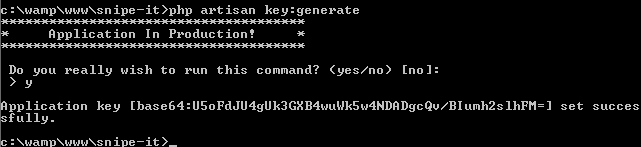
This will update the app key in your
 Be sure to keep this app key in a safe place, as it is necessary for decrypting any encrypted fields you might add.
http://localhost/snipe-it/public/


 Finnaly done

.env file:http://localhost/snipe-it/public/


